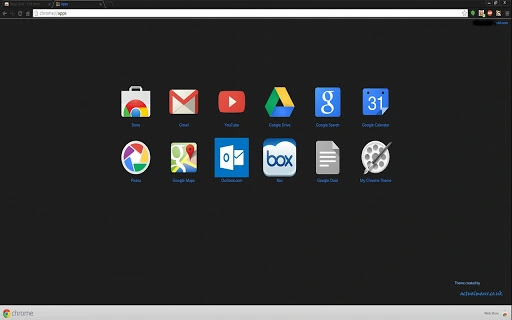

Dark Carbon Theme with Blue Text
Overview
This software is a browser theme designed for enhanced visual customization in web browsing environments. It offers a dark carbon aesthetic with blue text, drawing inspiration from the popular FT DeepDark Firefox theme. The theme is intended for users seeking a distinctive and modern interface for their web browser. It is compatible with both Firefox and Chrome across Windows, Mac, and Linux operating systems. The design emphasizes visual harmony, particularly when paired with matching extensions like Deep Dark Scrollbars and GT DeepDark for Google.
Target users include individuals who prioritize aesthetic customization in their digital workspace, especially those who prefer dark mode interfaces for improved eye comfort during extended browsing sessions. The theme is suitable for both casual users and power users who enjoy tailoring their browser’s appearance with cohesive styling elements. Real-world usage scenarios include personal browsing, content creation, and professional workflows where visual consistency across tools is valued.
The developer did not provide additional background information. No specific technical requirements were listed beyond the supported platforms. The theme is distributed as a free desktop application, with no licensing fees or subscription models involved.
Key Features & Capabilities
- Dark Carbon Aesthetic – A sleek, deep black base with subtle texture, providing a premium and modern look that reduces screen glare.
- Blue Text Highlighting – Contrasting blue text improves readability and draws attention to important interface elements, enhancing user focus.
- Custom Scrollbar Integration – Designed to work seamlessly with companion extensions like Deep Dark Scrollbars for a unified visual experience.
- Cross-Browser Compatibility – Functions on both Firefox and Chrome, enabling consistent styling across multiple platforms.
- Platform Agnostic Design – Supports Windows, Mac, and Linux, ensuring broad accessibility for diverse user bases.
Users can apply this theme to create a visually immersive browsing environment. For instance, content creators may use it to maintain a consistent dark UI across their workflow tools. Developers or designers who use multiple browser-based applications might benefit from a unified look that reduces visual fatigue. The theme’s compatibility with other styling extensions allows for layered customization, enabling users to build a personalized browsing experience without compromising interface clarity.
User Interface, Workflow & Performance
The user interface of this theme is entirely visual, focusing on altering the browser’s appearance rather than introducing functional changes. Navigation remains unchanged, as the theme modifies only the visual layer of the browser’s user interface. The workflow is straightforward: users install the theme via their browser’s extension marketplace, select it from the appearance settings, and apply it immediately.
Performance impact is minimal, as the theme does not execute background processes or alter browser functionality. The developer did not specify resource usage details. However, based on general software behavior patterns, such themes typically consume negligible CPU and RAM. Stability is expected to be high, as visual themes are generally non-invasive and do not interfere with core browser operations.
Users may experience slight rendering differences depending on their system’s graphics settings. For example, some users reported black bars appearing near the top of the screen, which can be resolved by adjusting hardware acceleration settings in the browser’s advanced preferences. This suggests that visual fidelity may vary slightly based on system configurations.
Compatibility & System Requirements
The theme is compatible with Firefox and Chrome browsers on Windows, Mac, and Linux operating systems. The software version is 1.0.0, with a file size of 1.5 MB. Installation is straightforward through the respective browser’s extension store.
Exact system requirements were not listed. Compatibility information was partially provided, indicating support for major desktop platforms. No specific hardware requirements were mentioned. The developer did not specify minimum processor speed, RAM, or GPU capabilities needed for optimal performance.
Users should ensure their browser is updated to the latest version to maintain compatibility. The theme does not require administrative privileges for installation and can be applied by standard users.
Pros and Cons
Pros
- Visually striking dark carbon design with blue text for enhanced contrast
- Seamless integration with companion extensions for consistent styling
- Available at no cost, making it accessible to all users
- Supports multiple operating systems and major browsers
- Minimal performance impact and non-invasive design
Cons
- No official developer information provided
- System requirements and resource usage details not specified
- Some users may experience visual artifacts like black bars (resolvable via settings)
- Only aesthetic changes—no functional improvements
- Requires additional extensions for full visual consistency
FAQ Section
Is this theme compatible with my browser?
Yes, the theme is designed for Firefox and Chrome. It supports Windows, Mac, and Linux operating systems.
Is the theme safe to install?
Yes, the theme is a standard browser extension that only modifies visual elements. It does not collect data or introduce security risks.
How do I install this theme?
Install it via the Firefox or Chrome Web Store. Once downloaded, go to your browser’s settings, select Appearance, and choose the theme from the list.
Can I use this theme without additional extensions?
Yes, the theme works independently. However, pairing it with compatible extensions like Deep Dark Scrollbars enhances the overall visual experience.
Does this theme require an internet connection to work?
No, once installed, the theme functions entirely offline. It does not require an active internet connection to display its design.
Final Thoughts + CTA
This dark carbon theme with blue text delivers a polished, modern look that elevates the visual experience of web browsing. Its clean design, cross-browser support, and free availability make it a compelling choice for users who value aesthetics and personalization. While it does not add functionality, its seamless integration with companion extensions and minimal performance impact ensure a smooth experience across devices.
It is ideal for users who enjoy customizing their digital environment and want a consistent, stylish interface. Whether for daily browsing, creative work, or professional use, this theme enhances the user experience through thoughtful design.
Download Dark Carbon Theme with Blue Text now







